Product presentation · Confirm configuration with your quotation
KES / Skin tightening
MED-260 RF Skin Care Device Manufacturer
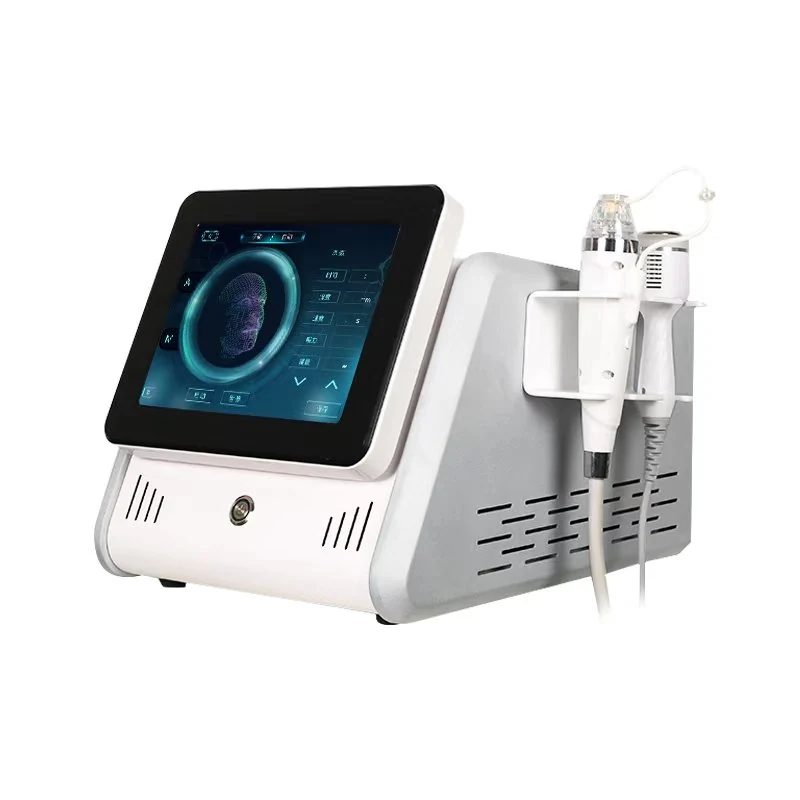
MED-260 is the KES RF skin care device for professional equipment enquiries. Its published specification includes maximum output power of 120W, adjustable energy levels from 1 to 5, and settings for RF energy and vacuum intensity. Use this guide to review the documented configuration, prepare questions about the supplied tips and interface, and request a quotation matched to your purchasing requirements.
View specifications ↓For distributors and professional procurement.
Share your destination market when you enquire.
Share your destination market when you enquire.
Technical specifications
| Machine Consumption | 150 VA(Max) |
|---|---|
| Power Supply | 220V /110V 50Hz/60Hz |
| Screen Resolution | 1920×1080 |
| MAX Output power | 120W |
| HANDPIECE TIPS | I ( eye around ,check,forhead) II (FACE ,neck,Jaw ) |
| Energy | 1-5 Levels Adjustbale |
| Setting | RF energy,Vacuum intensity |
Options and order-specific details should be confirmed in the final quotation.
Evaluate MED-260 as a specific RF skin care product
Use the complete MED-260 model name when requesting photographs, technical documents or a commercial proposal. The product is identified as an RF skin care device. Keep that identity attached to the information you collect so specifications from another RF product do not become part of the offer by accident. A technology category is useful for browsing, but an order needs a clearly identified configuration.
Begin by explaining your organisation's role and the destination market. A distributor assessing equipment for resale may need a different document package from a purchasing manager preparing an internal review. State whether you are gathering initial information, arranging an evaluation or requesting an itemised proposal. Then list the decisions your team needs to make before proceeding with the purchase.
Ask for current photographs of the cabinet, supplied handpiece tips and control interface. Request a written list that connects each pictured item to the quotation. This avoids treating an illustrative product image as confirmation that every visible accessory is included. Keep the model, item identifiers and configuration revision together so your technical and commercial colleagues work from the same proposed package.
Keep output power and machine consumption separate
The published maximum output-power entry is 120W. Machine consumption is listed separately as 150VA maximum. Preserve those labels and units in your comparison. They describe different specification entries and should not be collapsed into one figure. If your technical reviewer needs the underlying definitions or measurement conditions, request the relevant documentation rather than interpreting the values from the labels alone.
The power-supply entry lists 220V/110V at 50Hz/60Hz. Ask which version will be supplied for your destination and request the complete connection and installation requirements. A voltage entry is a starting point for site preparation, not a complete electrical installation plan. The person responsible for your premises should review the actual requirements before the equipment is delivered.
When comparing quotations, check that the same proposed configuration appears on both the technical schedule and the commercial offer. If a discussion introduces an alternative accessory or electrical version, request an updated written schedule. This keeps approval tied to the equipment being ordered and prevents a later revision from being missed by someone reviewing only the original price sheet.
Review energy levels and vacuum controls through documentation
The MED-260 specification lists adjustable energy levels from 1 to 5 and identifies RF energy and vacuum intensity as settings. These are control descriptions, not a treatment protocol. Ask how the available controls are presented on the supplied interface and which instructions explain their use. A purchasing page should not be used to select settings for an individual or to replace professional assessment.
Request a demonstration focused on the interface and equipment identification. Ask the presenter to show the control labels, navigation and the relevant documentation for the quoted version. If your organisation requires a particular language or workflow feature, make that an explicit question. Do not infer the availability of a software function from a general product name or an image of a different version.
For technical approval, record which controls have been confirmed and which questions remain open. If your team needs to understand how energy and vacuum settings interact, request the relevant explanation in the official instructions. Avoid constructing an operating sequence from separate catalogue entries. The purchasing task is to obtain the correct information and establish who will review it, not to create an undocumented procedure.
Identify the tips and their supporting instructions
The published specification distinguishes handpiece tips labelled I and II. Ask for a current tip schedule that identifies the items supplied with your quotation and the documentation applicable to each. Request photographs or drawings with identifiers so the receiving team can recognise the contents of the package. Do not assume the number of replacement items included from the existence of different tip labels.
Ask how the supplied tips should be inspected, cared for and stored according to the instructions. Request information on compatible replacements and the identifiers needed when ordering them. These are ownership questions to resolve with the supplier, not claims about a fixed service interval or replacement cost. Keep any agreed spare-item package separate from the basic equipment list in the commercial proposal.
For a distributor, confirm how tip descriptions will appear in local product information. Ask for approved terminology and the scope of the supporting documentation before preparing customer-facing materials. A product illustration or short label should not become a broader claim about clinical suitability. Your descriptions should stay connected to the documented configuration and the relevant local requirements for the equipment you intend to offer.
Examine the display and physical setup as separate requirements
The published screen-resolution entry is 1920 × 1080. That figure describes resolution; it does not provide the cabinet dimensions or a complete interface specification. Ask to see the quoted interface and request confirmed physical measurements for installation planning. Keeping display information and equipment size in separate fields helps avoid assumptions when a purchasing team is comparing compact-looking devices from photographs.
Request net weight, packed dimensions, gross shipment weight and handling instructions for the proposed order. Review the delivery route and final location with the people responsible for receipt and positioning. Ask for connection locations and any clearances required by the instructions. Those answers should guide the layout rather than an estimate based on how the machine appears in a catalogue image.
If your premises require a particular support surface, storage arrangement or equipment position, describe that requirement in the enquiry. Ask the supplier to identify the relevant installation conditions. Do not assume that every layout is suitable because the unit fits visually into the available space. Your site review should consider the confirmed equipment dimensions and the tasks described in its operating and care documentation.
Prepare an RF equipment comparison that supports a decision
A useful MED-260 comparison includes model identity, maximum output-power entry, consumption entry, supply requirements, energy-level controls, vacuum-setting information and supplied tips. Add a column for documentary evidence and another for unresolved questions. This approach lets your team distinguish confirmed features from information still needed before purchase without reducing the choice to a single power number.
Use the skin-tightening category to organise related equipment enquiries, while retaining each model's own specification and proposal. Ask for a separate technical schedule for every device on your shortlist. Products in a broad RF category may require different purchasing questions, and a shared category does not establish matching accessories, controls or intended-use documentation. Compare the actual offers your team has received.
Bring the relevant colleagues into the review early. A purchasing manager may focus on the package and delivery terms, a technical reviewer on documentation and installation, and a distributor on accurate local product information. Record who must approve each requirement. A quotation is easier to assess when responsibilities are clear and the final decision does not depend on one person interpreting every detail alone.
Define the commercial package and handover requirements
For an OEM or branding discussion, describe the requested product presentation, packaging language and accompanying materials. Ask which changes can be considered and what review process, order conditions and timing would apply. Keep those requests distinct from confirmed equipment features. A proposed logo treatment or translated label does not establish that a technical modification or interface change is available.
Request the model-specific documents your purchasing team, importer or local adviser needs. Review their scope against the proposed equipment and destination. Before dispatch, agree on the identification, accessory list, visible-condition record and documentation you want checked. Ask how discrepancies will be reported. The receiving team should be able to compare the delivered unit with a clear approved record.
Discuss support as a written part of the proposal. Ask how technical enquiries are submitted, what identifiers are needed, how replacement tips are requested and what handover arrangements can be discussed. Confirm the applicable commercial terms rather than inferring a service response time or warranty period. A complete MED-260 enquiry should result in a defined equipment package and an understandable record of the responsibilities attached to it.
Before you enquire
Questions, answered.
What type of equipment is MED-260?
MED-260 is identified as a KES RF skin care device. Use that model name when requesting information and ask for the current configuration schedule. Keep its specifications separate from other RF products in a shortlist. The equipment category helps organise the enquiry, but the technical documents and commercial offer should describe the particular unit and accessories being proposed.
What power figures are published for this model?
Maximum output power is listed as 120W, while machine consumption is listed as 150VA maximum. Preserve the separate labels and units when comparing offers. Ask for technical definitions or measurement conditions if your review requires them. Neither entry should be converted into a promise about treatment results, operating speed or the commercial performance of your organisation.
Which controls are described in the specification?
The source lists adjustable energy levels from 1 to 5 and settings for RF energy and vacuum intensity. Ask for a demonstration of the quoted interface and the instructions explaining those controls. These entries are equipment descriptions, not recommendations for use on an individual. Professional operation and parameter selection require the relevant training, documentation and assessment.
Are the supplied tips fully defined by their labels?
The specification distinguishes tips I and II, but a purchasing agreement should identify the actual supplied items and quantities. Ask for a current tip list, photographs and the applicable instructions. Request replacement identifiers and any separately priced spare items. This lets your receiving and service teams work from a clear equipment record without assuming what a short catalogue label includes.
What should I include in a MED-260 quotation request?
State your destination, company role, intended quantity and the requirements your team needs to verify. Ask for the exact tip package, electrical version, documentation and commercial terms. If branding is part of the project, describe it separately through the OEM/ODM enquiry route. Keep the model reference visible so the response addresses MED-260 rather than a general RF equipment enquiry.
Keep exploring
Explore category →In the same collection.
Your next equipment project
Let’s build your shortlist.
Tell us your market, preferred model and configuration questions.